LumiRank

Autonomous AI marketing agency

One AI agent runs all your marketing.

It sets up everything: SEO, GEO, campaigns and content. Then it checks your numbers every day, suggests what to change, and adjusts by itself. You approve what matters.

checks and adjustments
Daily
Google and AI answers
SEO + GEO
Canadian businesses signed
5

Sign in to your agent

Use the email and password LumiRank set up for you.

Forgot your password? Ask your LumiRank contact to reset it.

New to LumiRank? Book a demo

The agent

Tell it about your business. It does the rest.

Day one, it connects your site and sets up the work an agency would. From day two, it watches the results and tunes everything itself.

  • Sets up SEO, GEO, campaigns and a content plan
  • Checks every metric, every day
  • Suggests changes and makes the safe ones itself
  • Asks before anything big goes live

LumiRank agent

Your marketing, running

Live

Day 1

We’re a renovation company in Toronto. Get us more customers.

I connected your site and Search Console. Here’s what I set up:

  • SEO fixes on 12 pagesApplied
  • GEO answers for 8 questions AI engines askApplied
  • Google Ads campaign, $40/dayNeeds your OK
  • Blog calendar, 8 postsScheduled
  • Daily trend watch for your areaOn

Day 2 · 6:00 am check

Clicks
+12%
AI mentions
3 of 6
Ad leads
4

ChatGPT now names you for “kitchen renovation Toronto”. Kitchen ads convert 3× better, so I moved $10/day there from basements.

Next: a post on permit costs. Want to review it?
Illustrative preview. Not a client’s data.

What it runs

Everything an agency does. Without the agency.

One autonomous system handles the marketing and the conversation around it.

  • SEO

    Finds what holds your site back in Google, writes the fix and applies it.

  • GEO

    Gets you named in ChatGPT, Gemini, Perplexity and Google AI answers.

  • Campaigns

    Sets up paid campaigns, then moves budget toward what brings customers.

  • Blog and content

    Plans, writes and schedules posts around what customers are asking.

  • Trend watch

    Scrapes search, AI engines and your market daily, so the plan changes when they do.

  • Customer communication

    Answers questions, explains every change in plain language, and brings in a person when it should.

Plus analytics, reporting and more, added as the market moves.

Inside the platform

Already built. Here's what you get.

Real screens from the LumiRank portal, shown on a sample project.

01 · Dashboard

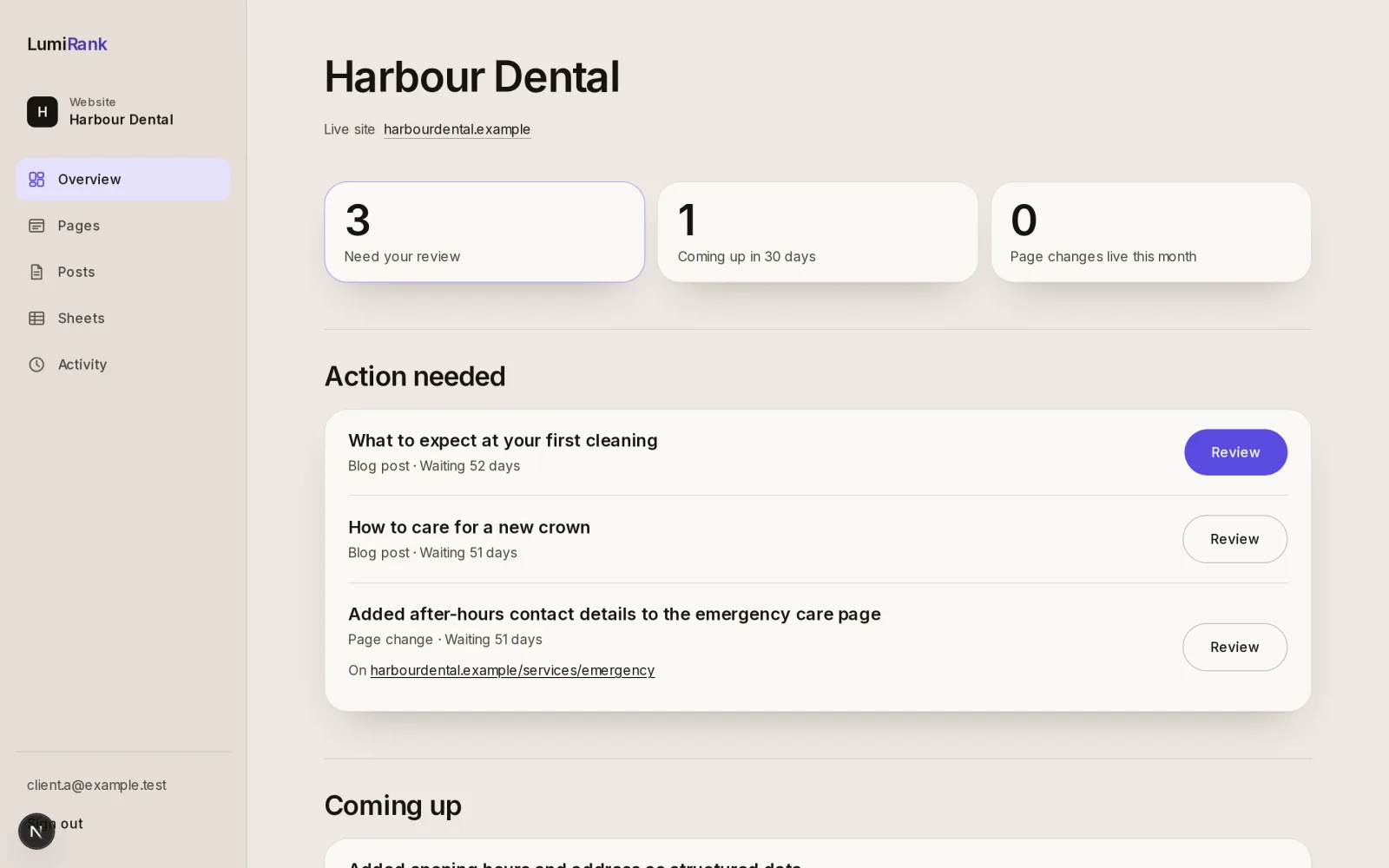
Everything that needs you, on one screen.

What's waiting for your review, what's coming up in the next 30 days, and the page changes that went live this month.

  • Action needed, first
  • Posts and page changes side by side
  • One click into each review
The portal's Overview for a sample dental clinic: 3 items need review, 1 coming up, and an Action needed list with two blog posts and a page change.

02 · Blog posting

Posts drafted, previewed and scheduled for you.

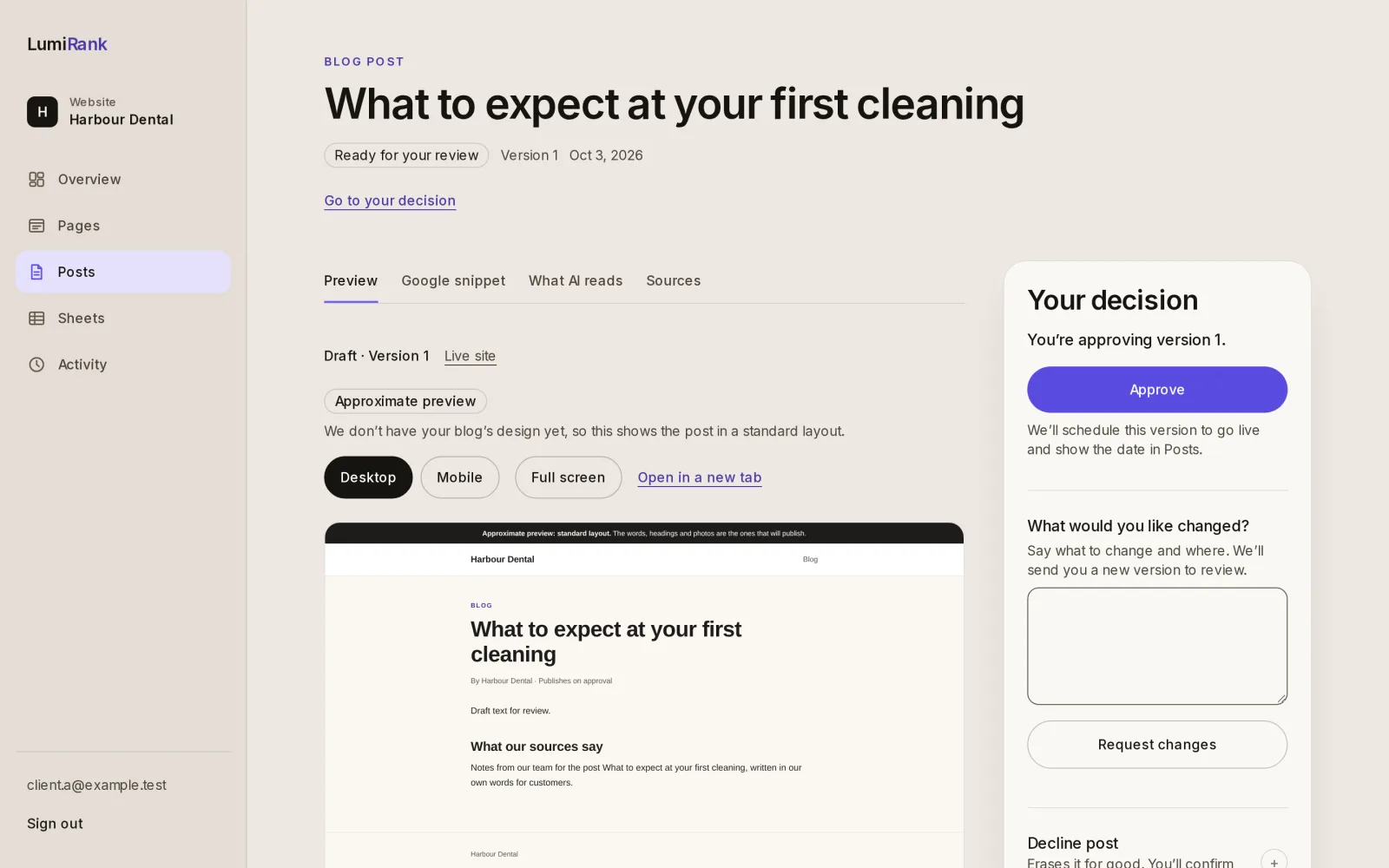
Every post goes from request to live in one list. Open a draft to see it as it will look on your blog, its Google snippet and what AI engines read, then approve it, ask for changes or decline it.

  • Preview on desktop and mobile
  • Google snippet and AI view
  • Approve, request changes or decline
A blog post review screen: a preview of the post in the site's layout on the left, and the Your decision panel with Approve and Request changes on the right.

03 · Read and comment

Comment on a post like a Google Doc.

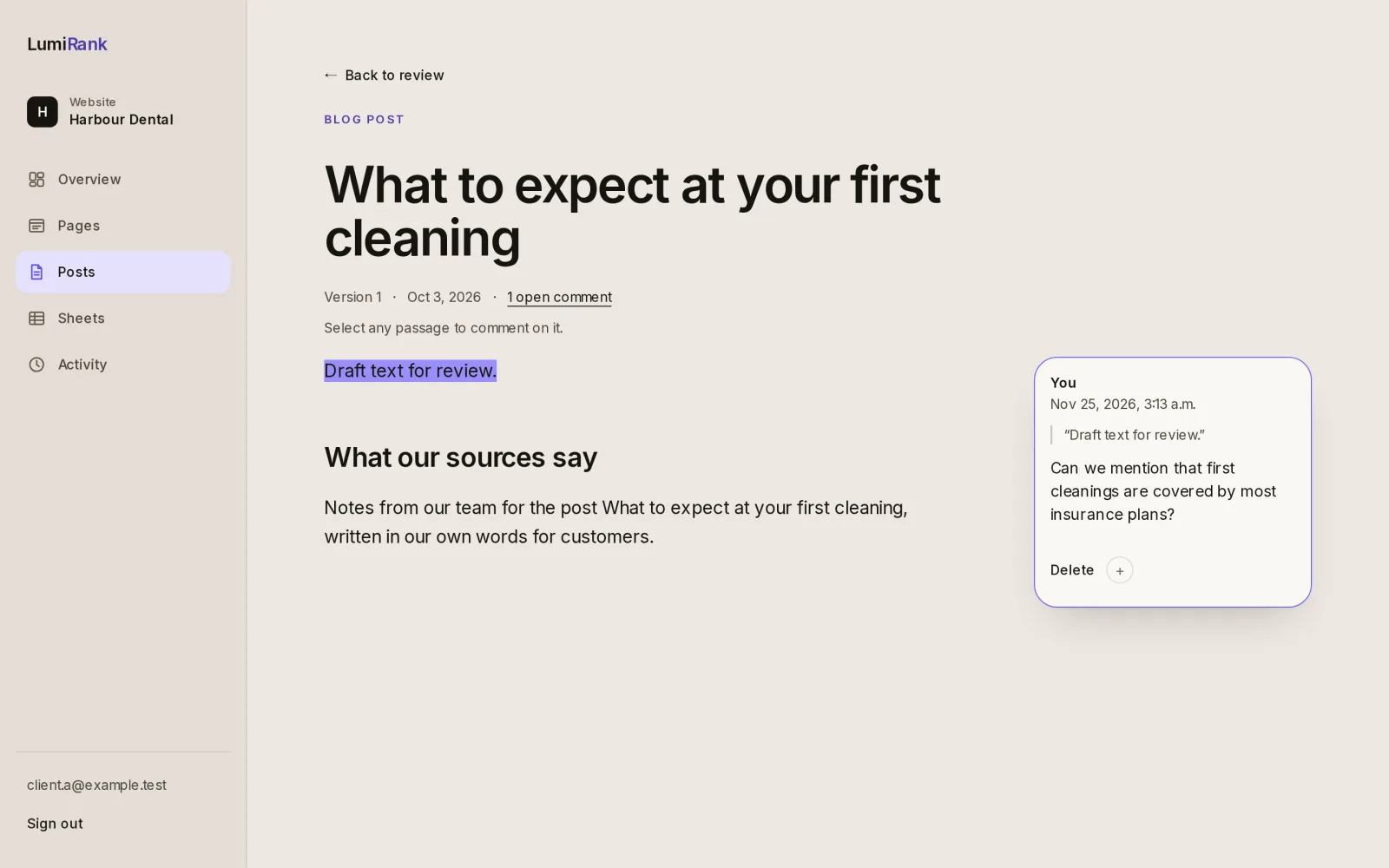
Select any passage and leave a comment beside it. LumiRank sees every comment and works it into the next version.

  • Select text to comment
  • Comments sit next to the passage
  • Every comment reaches the team
A blog post open to read, with one passage highlighted and a comment beside it asking to mention insurance coverage.

04 · Page changes · SEO and GEO

Every fix to your site, explained before it ships.

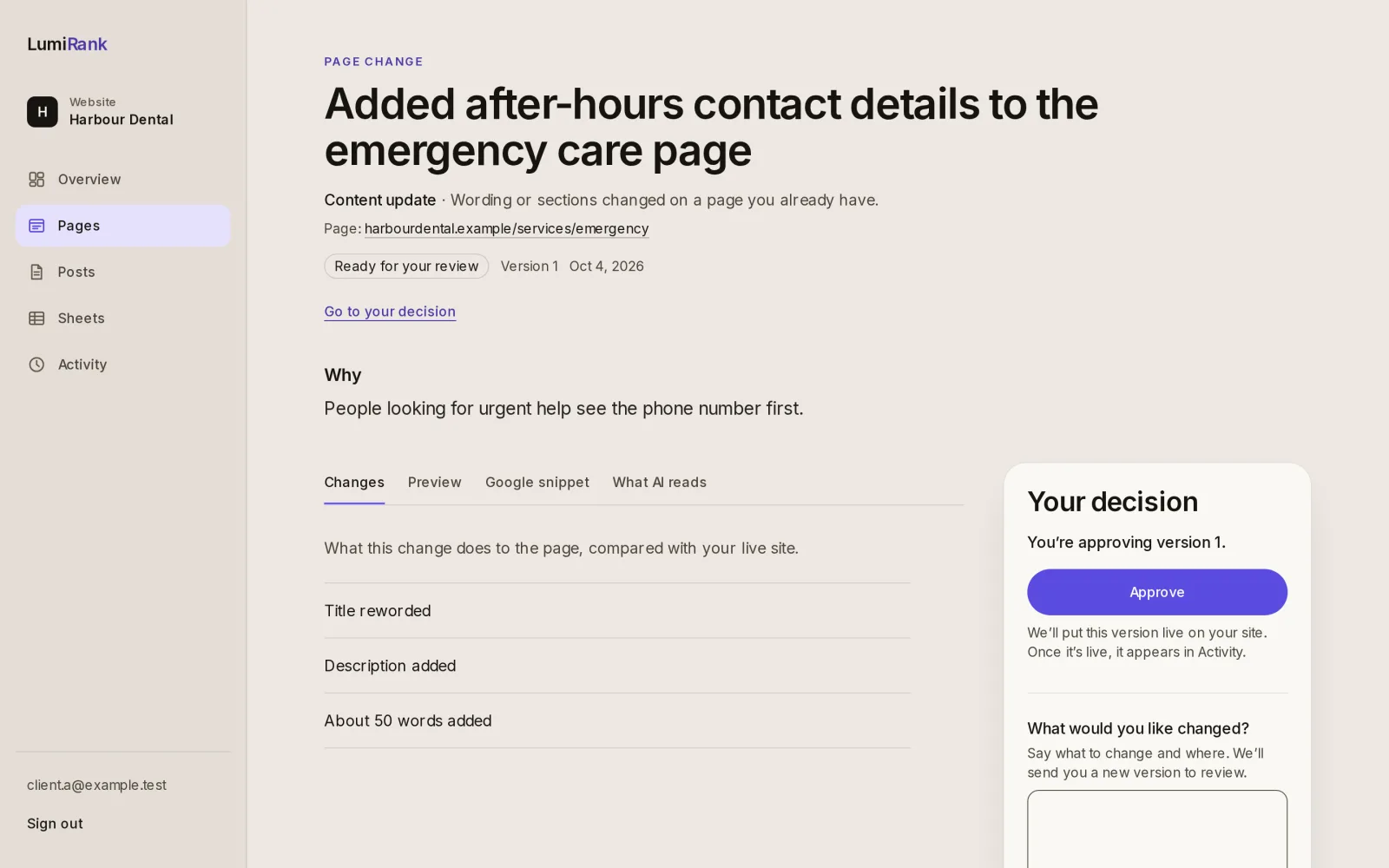
Each change says why it's being made, what it does to the page compared with your live site, and how it looks to Google and AI engines.

  • The reason, in plain language
  • What changes on the page
  • Nothing goes live without approval
A page change review: why it was made, a list of what changed on the page, and the Your decision panel.

05 · Activity

A record of everything that went live.

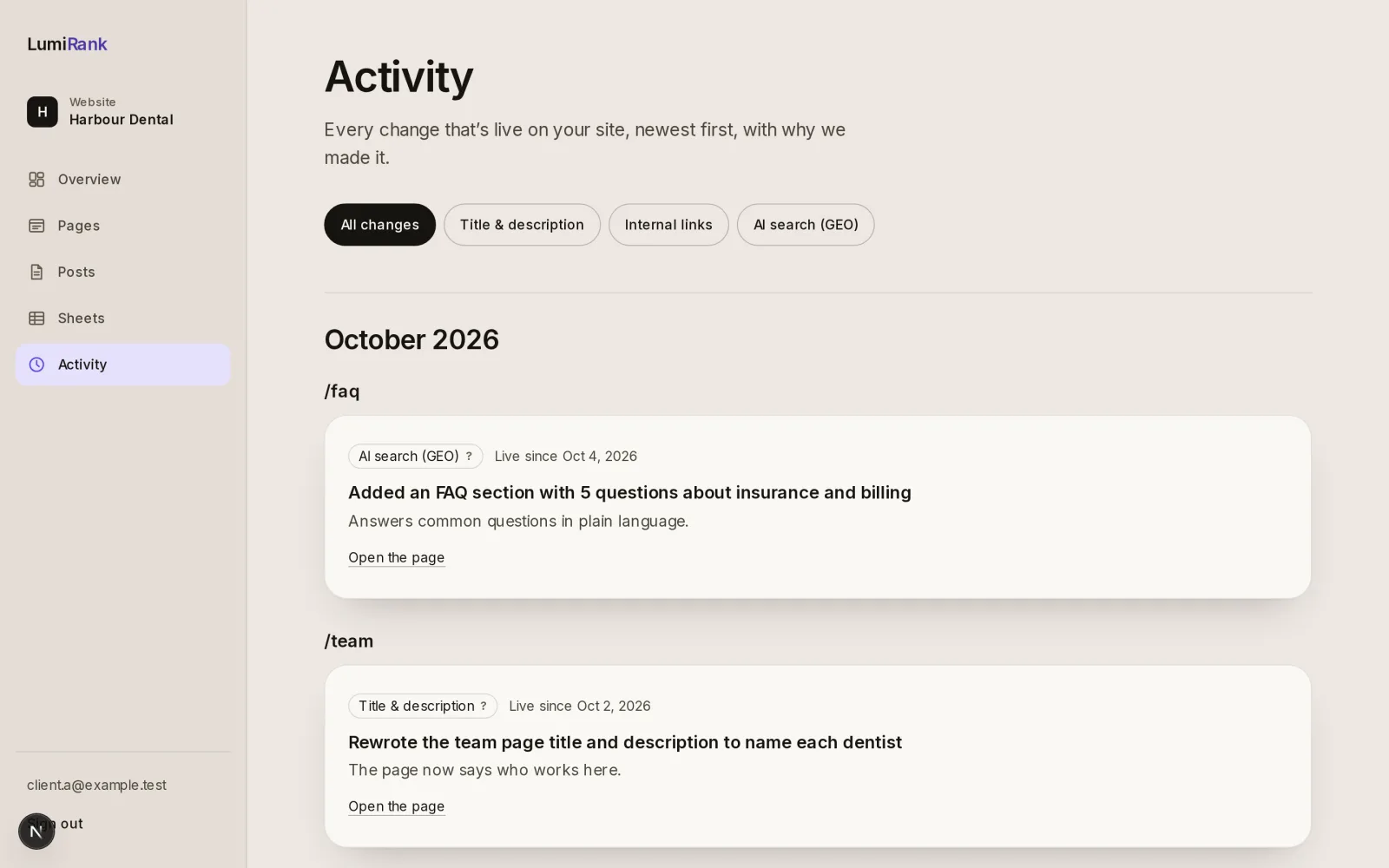
Every change on your site, newest first, with why it was made. Filter by title and description, internal links or AI search (GEO).

  • Newest first, with dates
  • Why each change was made
  • Filter by type of work
The Activity page listing changes that went live, such as an FAQ section added for AI search, with filters by type.

06 · Sheets

Leads, spend and your statement of work.

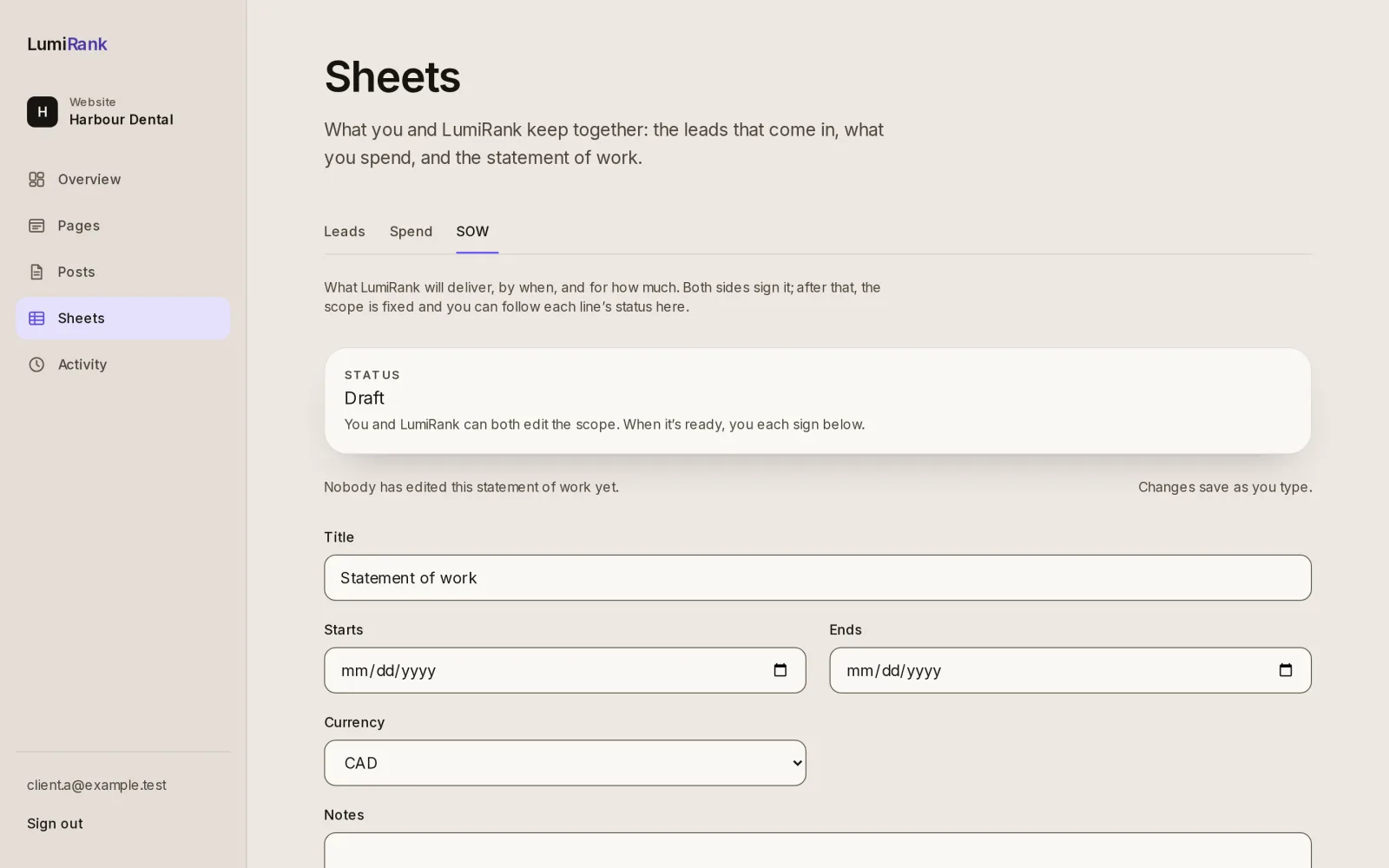
Shared sheets you and LumiRank both edit: the leads that come in, what you spend, and a statement of work you both sign and then track line by line.

  • Leads and Spend sheets
  • Changes save as you type
  • Statement of work signed by both sides
The Sheets page on the statement of work tab, showing its draft status, title, dates and currency.

07 · Chat

Ask about any post or change.

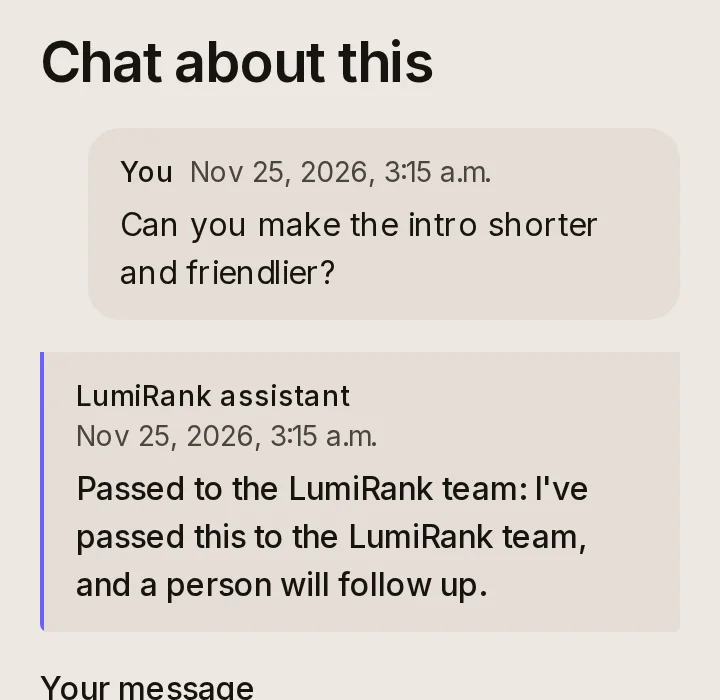
Every review has a chat. Ask a question or say what you'd like changed; the assistant answers, and passes anything that needs a person to the LumiRank team.

The chat on a post review: the client asks to make the intro shorter and friendlier, and the LumiRank assistant replies that it has passed this to the LumiRank team.

Coming soon

AI suggestions

Your agent starts the conversation.

You won't need to know what to ask. Every morning the agent reviews your numbers and messages you first: what to improve, what to change and what to do next, with the reason for each.

  • Spots what moved in search and AI answers
  • Proposes changes, most important first
  • You approve, adjust or say not now, in the chat
  • Approved work goes into Pages and Posts for review

Chat with your agent

  1. LumiRank agent

    Good morning. I checked last week's numbers. Your emergency care page is shown often in Google but rarely clicked, and AI answers about after-hours dentists don't mention you. Here's what I'd change: 1. Rewrite the emergency page title to lead with “Same-day emergency dentist”. 2. Add a short answer block on after-hours care for AI engines. 3. Draft a post: “What to do if you crack a tooth at night”. Approve all three, or tell me what to adjust.

  2. You

    Do 1 and 2. For the post, mention we take walk-ins on Saturdays.

  3. LumiRank agent

    Done. Both changes are in Pages for your approval, and the post draft is in Posts with the Saturday walk-ins. I'll report the effect next Monday.

Preview of an upcoming feature, in the portal’s chat. Sample messages.

How it works

It suggests. It adjusts. By itself.

A daily loop, not a monthly report. You set the limits; it works inside them.

  1. 01

    Checks

    Every morning it pulls your search, AI-answer, campaign and site numbers.

  2. 02

    Decides

    It works out what moved, what's slipping and what to do next.

  3. 03

    Adjusts

    Small changes inside your limits it makes itself. Bigger ones wait for your OK.

  4. 04

    Reports

    It tells you what it did and why, in plain language, in the portal.

Why we built it

Agencies are stuck at scale. So we asked AI to change it.

  • Agency workload grows with every client.
  • Every new client means another hire.
  • Big agencies run on legacy software and old workflows.
  • Trends like GEO move faster than they can retool.

GEO is the new standard of marketing, and it arrived in months, not years. An agent that checks every signal daily keeps up where a growing team can’t.

  • MVPBuilt and running for real clients
  • 5Canadian businesses signed
  • ↑Clients' visibility metrics multiplying
Read the published case studies

Let the agent run your marketing.

See it set up on your own business. You’ll talk to the founders, not a sales rep.